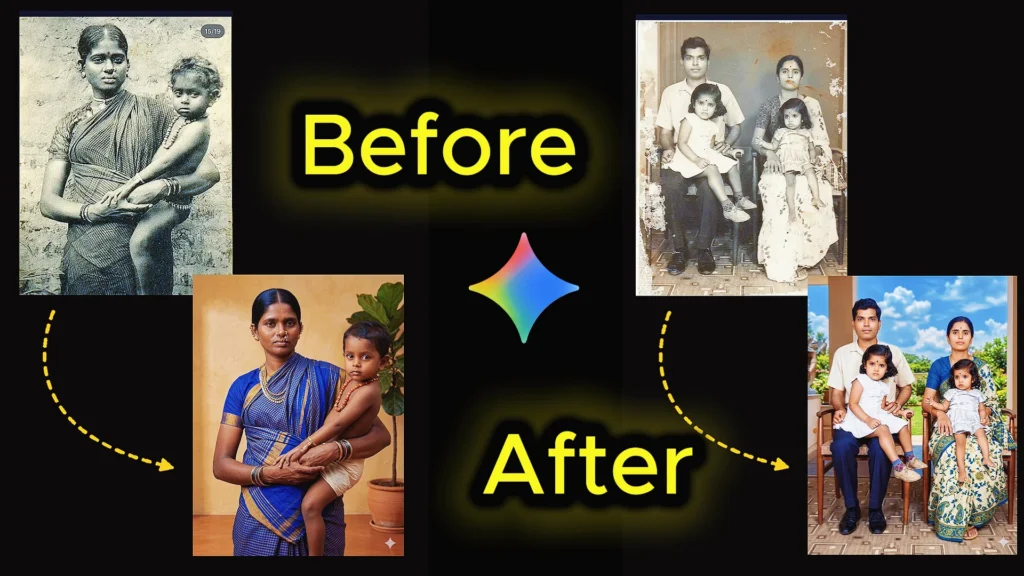
Creating high-quality AI image prompts for photo restoration and enhancement has become one of the most powerful ways to transform old, damaged, or low-resolution images into stunning modern visuals. Whether you’re looking to restore vintage photographs, upgrade clarity to 4K or 8K, or generate cinematic portraits with realistic lighting and textures, the right old photo restoration prompt for gemini ai to makes all the difference.
In this guide, you’ll discover carefully crafted old photo to new photo ai prompts designed to preserve facial identity, improve image quality, and deliver professional DSLR-level results. From removing scratches and restoring faded details to converting black-and-white photos into natural color, these old photo restoration ai prompts help you achieve lifelike, high-resolution outputs with ease. If you want consistent, photorealistic results using AI tools, these old photo restoration prompt gemini ideas will give you a strong starting point.
10 Best Old Photo Restoration Prompt Gemini: Best AI Prompts for 4K Results
Explore powerful old photo restoration google gemini prompt. Fix scratches, improve quality, and turn vintage images into high-resolution modern photos.
1. Old Photo Restoration Prompt Gemini for Damaged Images
This old photo restoration prompt Gemini helps you repair heavily damaged photos by removing scratches, stains, and folds while preserving the original identity. It ensures realistic reconstruction of facial features and enhances clarity for a clean, modern look.
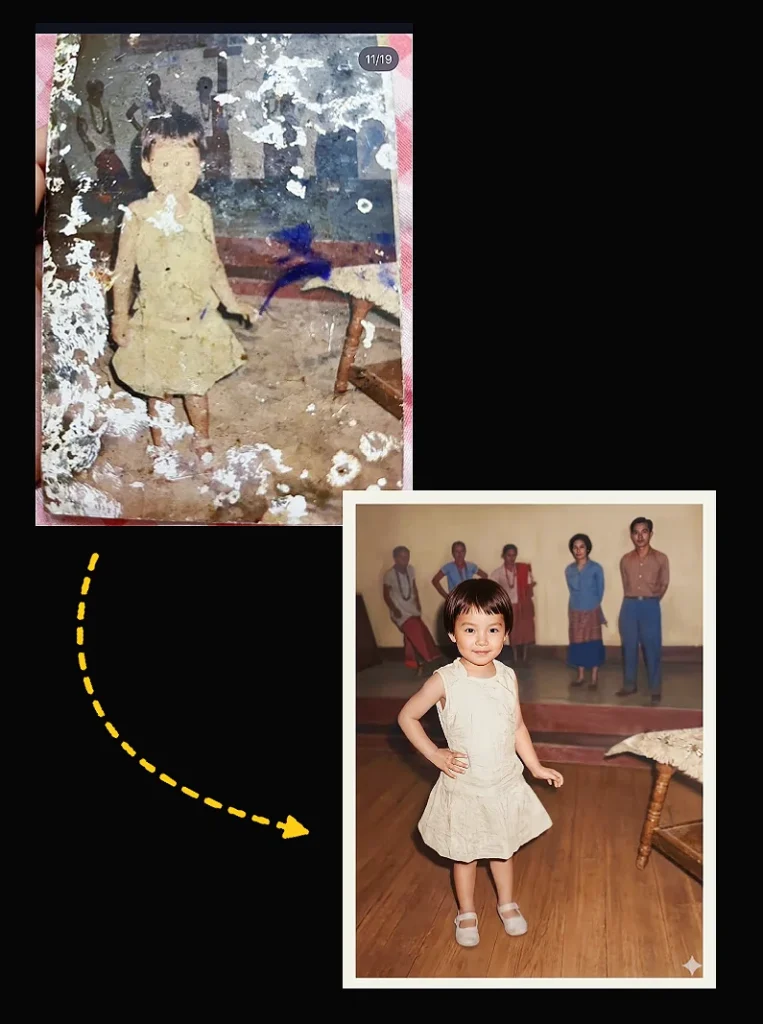
“Restore this old, heavily damaged photo by removing all visible scratches, dents, folds, and stains. Reconstruct missing or distorted facial features naturally and realistically while preserving the original identity and expressions of the person. Maintain the authentic vintage look, but enhance clarity, sharpness, and detail to look like a high-quality modern photo. If the photo is black and white, convert it to realistic color based on skin tone, hair, eyes, and background elements, ensuring the result looks natural and true to life.”2. Old Photo to New Photo AI Prompt for Modern Results
Turn your vintage images into high-quality modern photos using this old photo to new photo AI prompt. It upgrades colors, lighting, and sharpness while keeping the original pose and expression intact for a natural transformation.
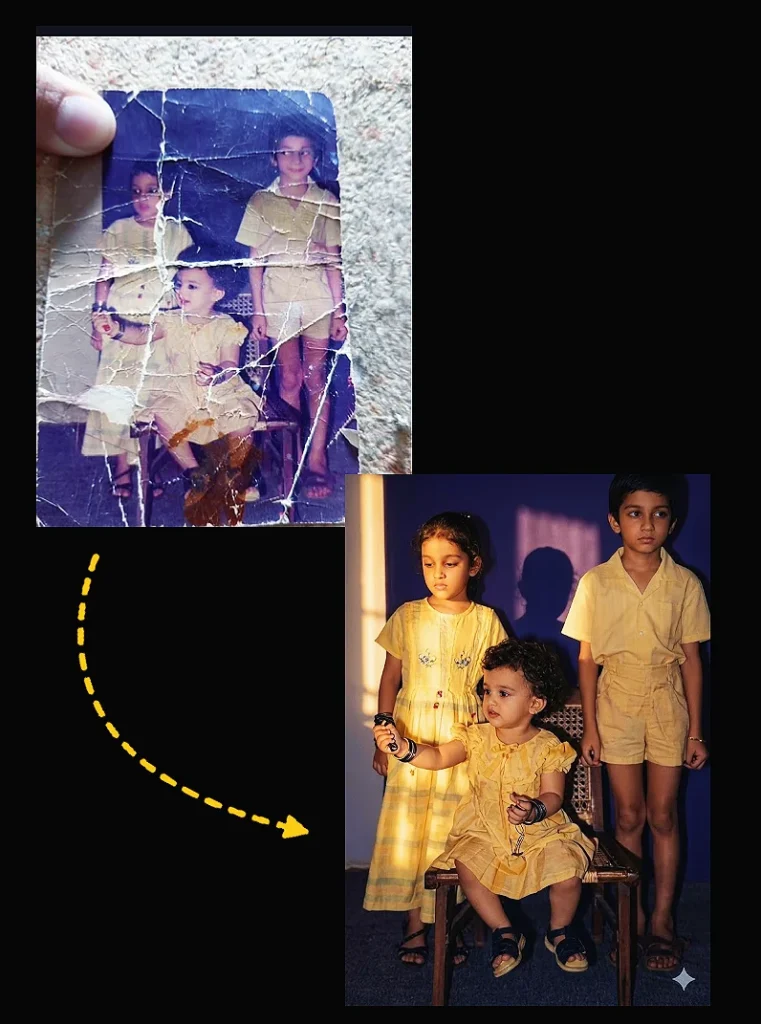
"Create a photorealistic cinematic portrait (aspect ratio of 9:16) by exactly replicating the provided reference image-preserve the subject's pose, facial expression, camera angle, framing, background, and every original detail without any alterations. Enhance lighting with natural warm golden-hour sunlight streaming from the side (camera left), casting a strong dramatic shadow of the face onto the plain wall behind; use soft yet high- contrast illumination for cinematic depth, moody mysterious atmosphere, warm glowing highlights, and deep velvety shadows. Restore to 4K-level clarity and quality: sharpen facial details and textures realistically, boost dynamic range, clarity, and color depth, eliminate noise and artifacts while maintaining natural skin photorealism-no smoothing or artificial effects. Apply subtle film grain, natural color grading, and professional photography"3. Old Photo Restoration AI Prompt for Realistic Enhancement
This old photo restoration AI prompt focuses on restoring faded details and improving overall image quality. It enhances textures, removes noise, and delivers a lifelike result without losing authenticity.
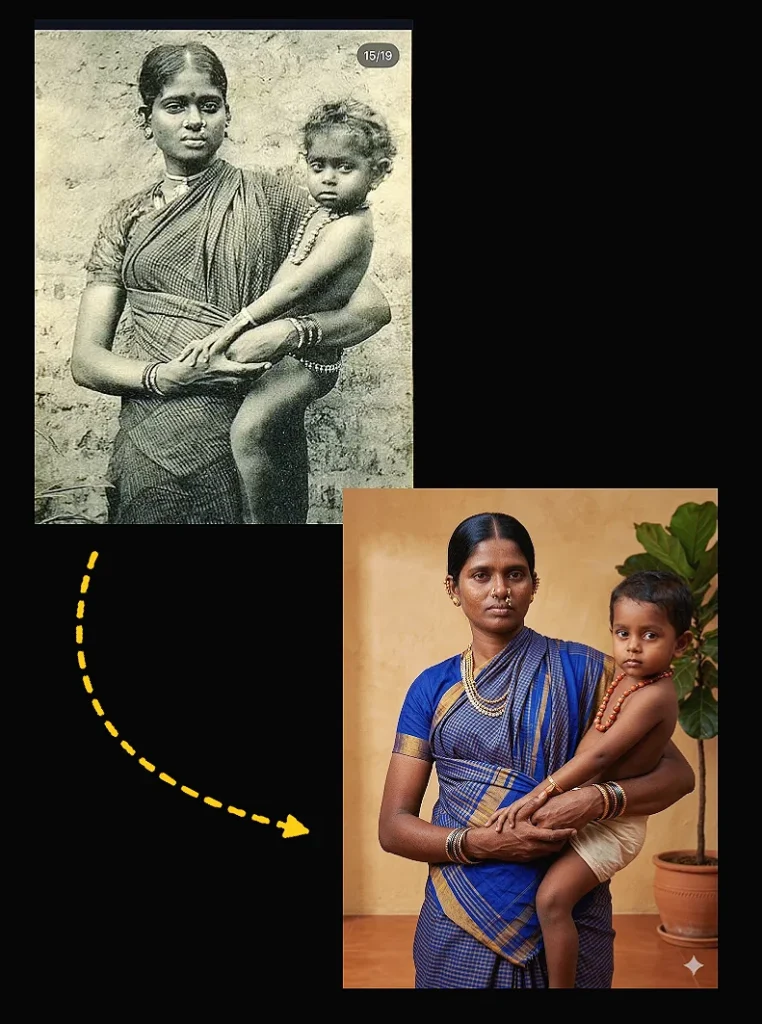
"Ultra-realistic recreation of an old vintage photo, keeping the same original face (99% likeness, no alteration). Transform into a modern high-quality digital portrait with vibrant updated colors, smooth realistic skin textures, and natural lighting. The outfit and background should be upgraded into a clean, modern aesthetic while preserving the authenticity of the original pose and expression."4. Best Prompt for Old Photo Restoration in Gemini (Cinematic Style)
Create cinematic portraits with the best prompt for old photo restoration in Gemini. It adds natural lighting, improves contrast, and delivers 4K-level clarity with a professional photography feel.
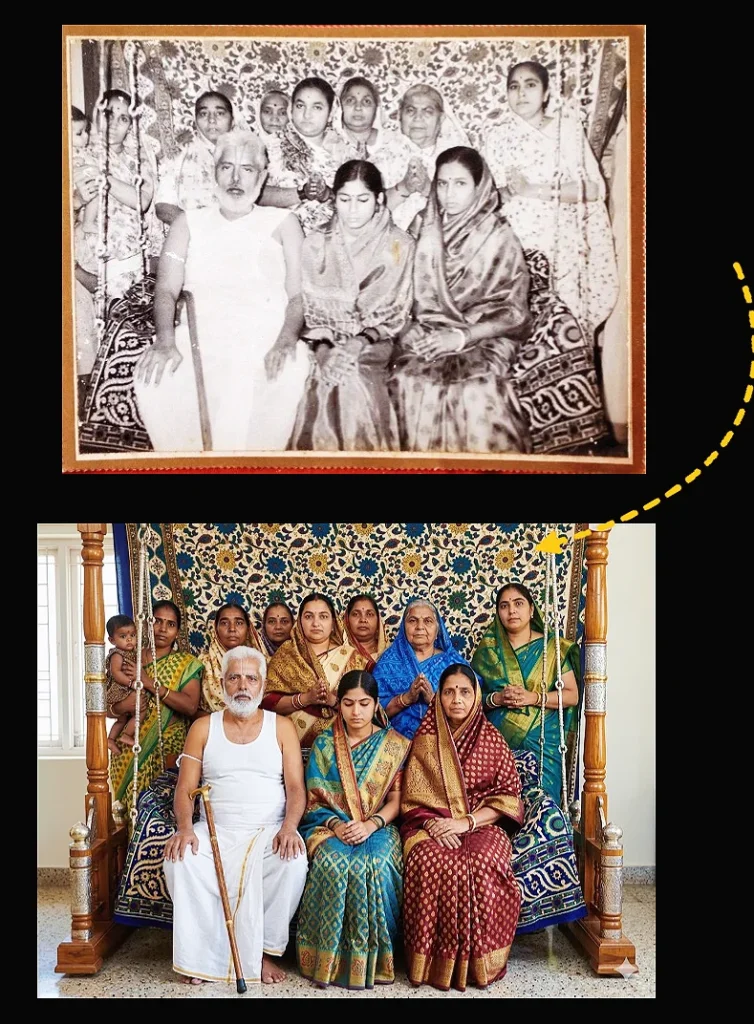
"Take this old photo and restore it into a modern, hyper realistic 2025 style image. Make it clean, simple, and direct: Restore the photo to look like a 2025 Canon EOS R5 shot with a 50mm f1.2 lens. Sharpen all details. Remove scratches, stains, dust, and texture. Detect every person, object, vehicle, and background element. Color each one with natural, real life tones. People: give realistic skin tones from deep brown to light tan. Add clean highlights and shadows. Color clothing with modern tones, including white, blue, red, green, yellow, black, and patterns like denim, wool, silk, or Ankara. Objects and vehicles: use real world colors like metallic silver, blue, red, yellow, green, cream, white, and black. Metal should reflect light. Wood should have clean brown grain. Glass should look clear.

Environment: asphalt roads in natural grey. Markings in bright paint. Trees and grass in rich green with variation. Buildings in natural concrete, brick, wood, or paint colors. Sky in clean blue when visible.

Lighting: use bright natural daylight or accurate indoor light. Add realistic shadows and reflections. Keep depth and perspective sharp. Deliver a modern, clean, vibrant, high clarity image with no vintage or sepia tones."
5. Old Photo Restoration AI Prompt Free for Accurate Results
This old photo restoration AI prompt free option is perfect for achieving high-quality restoration without complexity. It removes damage, sharpens details, and keeps facial features 100% accurate.
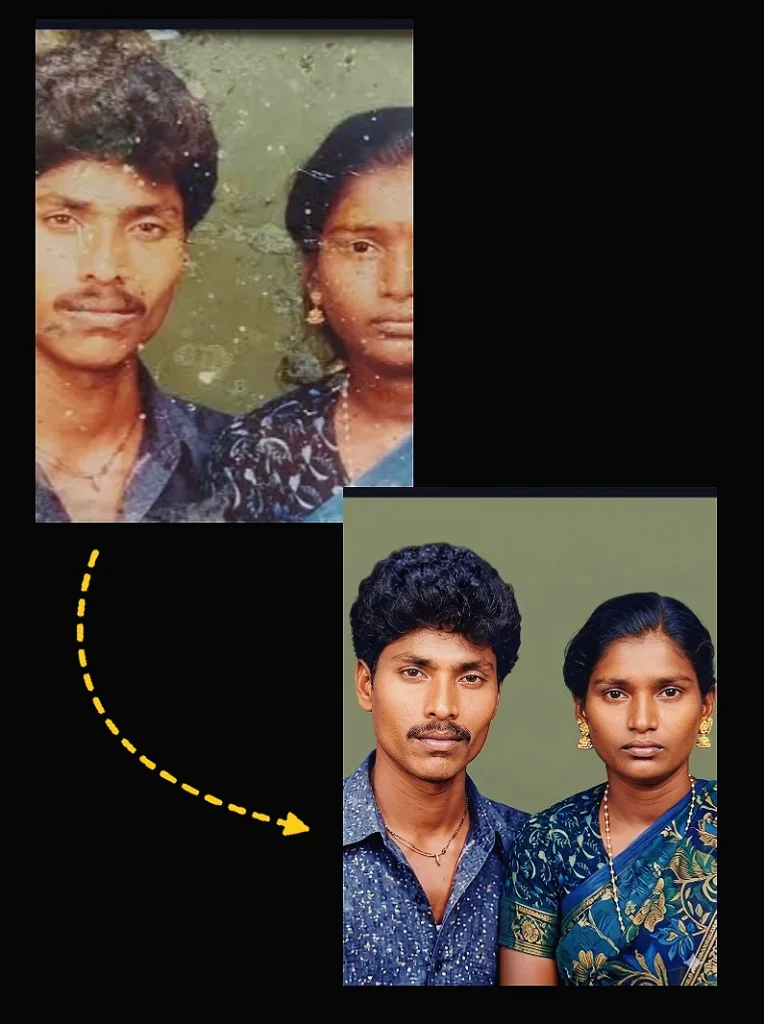
"Restore this old, heavily damaged photo by removing all visible scratches, tears, stains, folds, and aging marks while 100% preserving the original faces, expressions, and identities. Reconstruct any missing or distorted areas of the face and clothing naturally and realistically with no artistic interpretation or alteration of expressions. Retain every small facial detail like wrinkles, eye shape, lip contour, and hairstyle exactly as in the original. Enhance overall clarity, sharpness, and resolution to high-quality photo standards without losing authenticity. If the image is black and white, convert it to realistic natural color based on typical Indian skin tones, natural hair and eye colors, and traditional clothing. Ensure the background and lighting are smooth and neutral, matching the original studio look. The final result should look like a perfectly preserved real photograph, not Al-generated or stylized, and must reflect the original image with no facial change, no softening of expressions, and no cosmetic enhancement"6. AI Prompt to Restore Old Photos with Natural Colors
Use this AI prompt to restore old photos and bring them back to life with realistic colors. It converts black-and-white images into natural tones while maintaining true skin and background details.
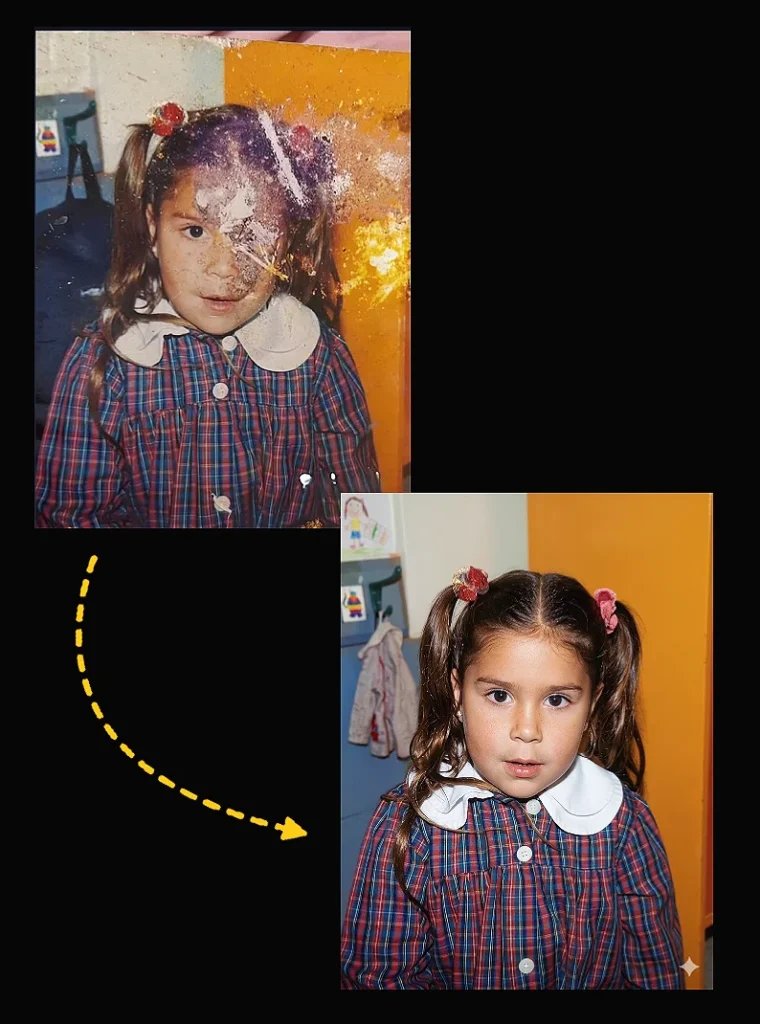
"Restore this old photo and enhance it with modern, high-quality color tones similar to today's professional cameras. Add natural, vibrant, balanced colors with realistic skin tones and clean highlights. Improve lighting, contrast, and depth to match modern DSLR/mirrorless camera output. Remove all scratches, noise, blur, and fading. Preserve the person's identity, facial features, expression, and historical clothing while giving the photo a fresh, newly-captured look. Increase resolution to 4K ultra-high quality with sharp, detailed textures. Avoid over-saturation, filters, or artificial plastic skin- keep everything natural and lifelike."7. Old Damaged Photo Restoration Prompt Gemini for Deep Repair
This old damaged photo restoration prompt Gemini is designed for photos with severe wear and tear. It rebuilds missing areas and restores clarity while maintaining original expressions and fine details.
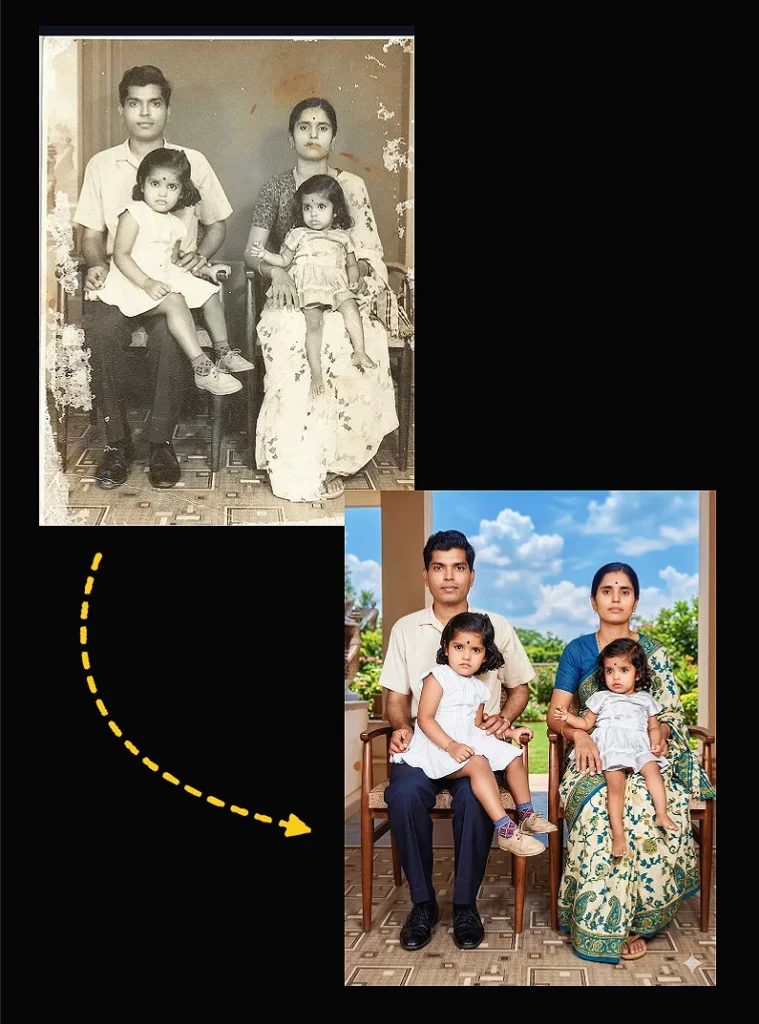
"Restore this old photo into a professional portrait of DSLR-quality HDR 4k colour and detail, using an advanced upscaling algorithm comparable to the results from the Canon EOS R6 Mark II. Ensure the restored image looks natural, retains exact building features, has great clarity and no noise. Descreen it. As if taken right now with Canon EOS R6 Mark II. Create a realistic sky."8. Old Blurry Photo Restoration Prompt Gemini for Sharp Results
Fix low-quality images using this old blurry photo restoration prompt Gemini. It improves sharpness, removes blur, and enhances resolution to create a crisp, DSLR-quality output.
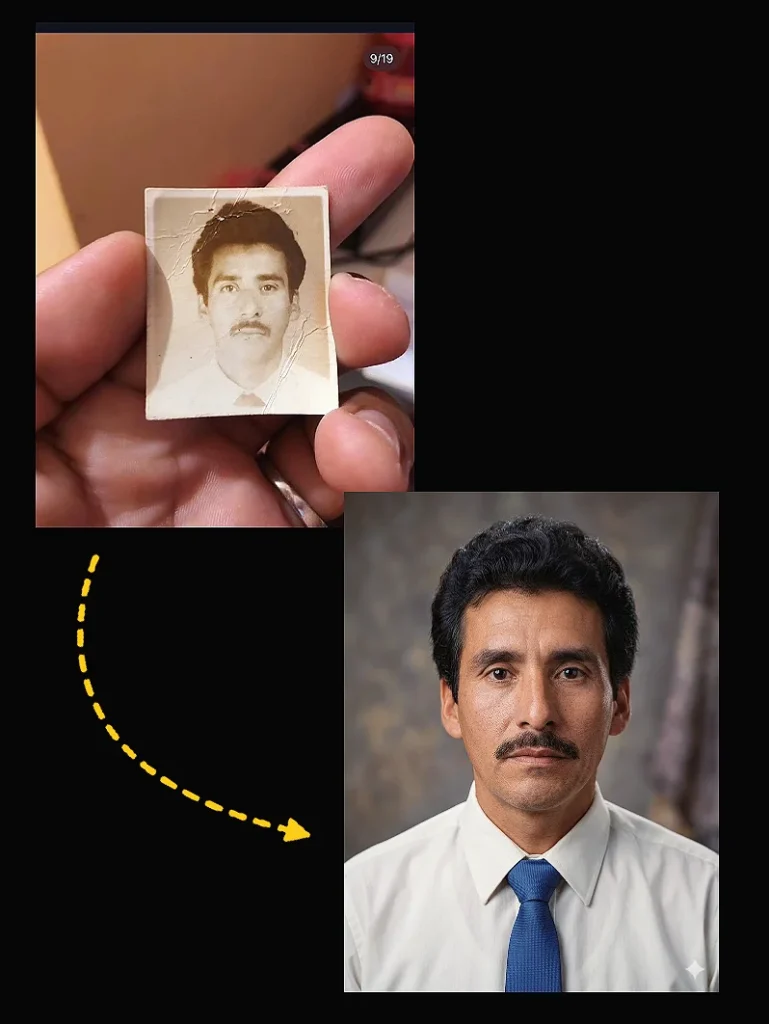
"Restore this old photo into a modern, high-quality portrait while keeping the original person's facial features, emotion, and personality intact. Rebuild missing details such as skin texture, lighting, and color tones naturally-without distortion or stylization. The final image should look like a recent professional DSLR photo (Canon EOS R5 quality), with realistic sharpness, balanced contrast, and zero noise."

Use natural studio lighting, soft background blur, and cinematic color grading to create a fresh, lifelike look.

Produce an ultra-realistic, full-color portrait with crisp details, depth, and clarity, as if it were taken today.

Output: Full HD, 32K quality, realistic colors, razor-sharp focus, no artifacts."
9. Gemini Old Photo Prompt for DSLR-Level Quality
This Gemini old photo prompt upgrades your images to professional DSLR quality. It enhances lighting, contrast, and textures to match modern camera standards while keeping the original subject intact.
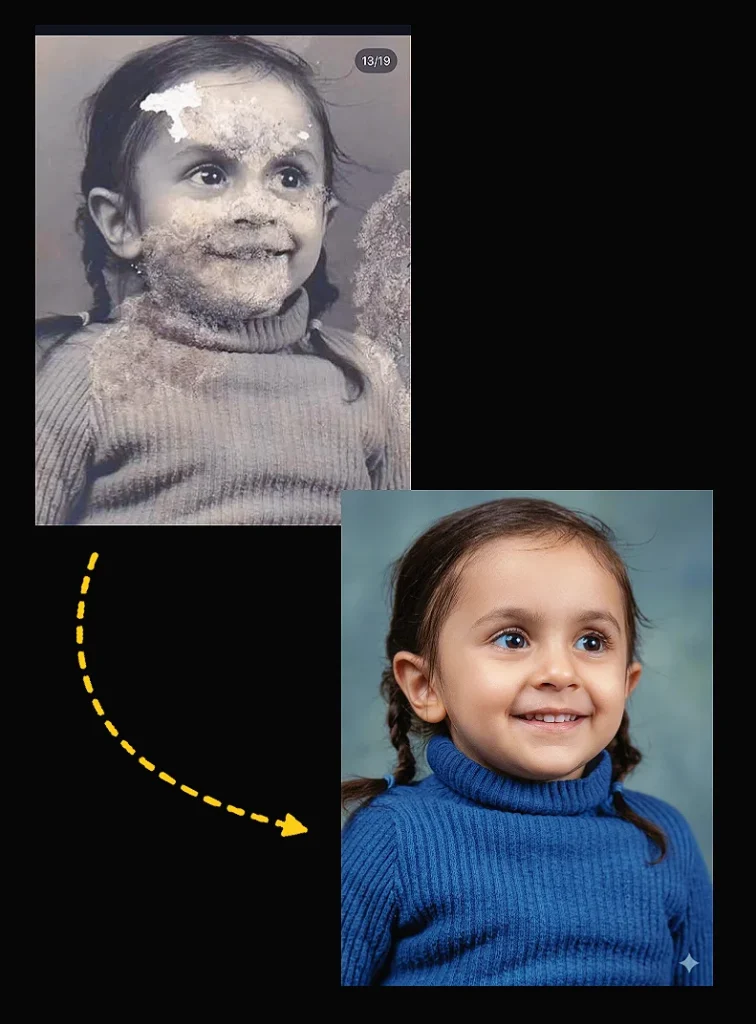
"Restore this old photo into professional portrait of DLSR - quality colour and detail, using an advanced upscaling algorithm comparable to the results from canon EOS R6 II. Ensure the restored the image looks natural, retains exact facial features, has great clarity..."10. Old Black and White Photo Restoration Gemini Prompt
Convert monochrome images using this old black and white photo restoration Gemini prompt. It adds realistic colors, improves detail, and transforms vintage photos into vibrant, lifelike visuals.
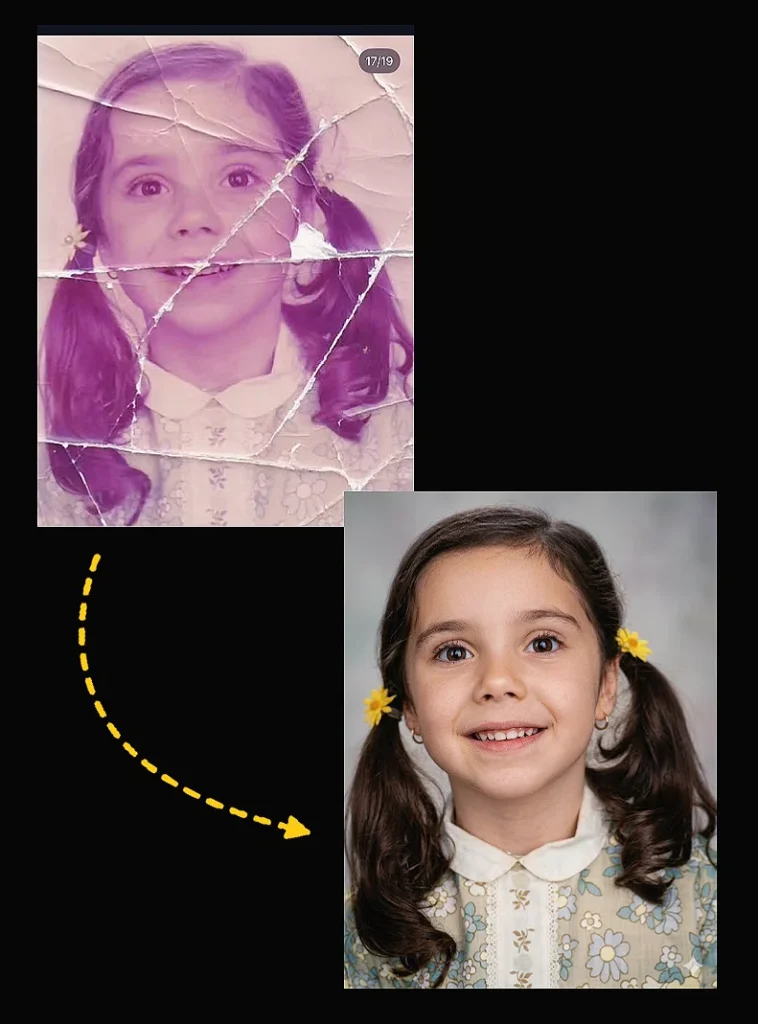
"Enhance this uploaded image to ultra-high resolution 8K quality, preserve original subject exactly, extreme sharpness and clarity, highly detailed natural textures, remove blur, noise and compression artifacts, accurate color correction, balanced exposure, cinematic soft lighting, professional DSLR photography look, photorealistic, ultra detailed, maximum quality."Restoring old photos has never been easier thanks to advanced AI tools and well-crafted gemini old photo prompts. By using the right old photo restoration prompt Gemini, you can repair damaged images, enhance clarity, and transform vintage memories into high-quality, modern visuals without losing their original identity.
Whether you’re working with blurry images, black and white photos, or heavily damaged pictures, these old photo restoration prompt for gemini ai give you a reliable way to achieve realistic and professional results. The key is to focus on preserving facial details, maintaining natural colors, and enhancing resolution without over-processing.
Start experimenting with these old damaged photo restoration prompt gemini and refine them based on your needs to get the best output every time. With the right approach, you can turn any old photo into a sharp, vibrant, and lifelike image that looks as if it was captured today.